The whole group trip, in a single app.
Itinerary, flights with check-in alerts, hotels and shared expenses, on every traveler’s phone. It updates live and works offline.

It was born for a real trip, not in an office.
A group of friends used it on a long trip through Southeast Asia. Everything you see here is what the app does today.
Without the app
- The spreadsheet nobody opens on their phone.
- The flight PDF buried in a WhatsApp group with 800 messages.
- “What time was check-in again?” at 3 a.m.
- Scrawled tallies and someone who always ends up paying more.
- You forget the adapter, the insurance or the tour ticket.
With the app
- Every day, with what’s on the plan, on everyone’s phone.
- Flights, bookings and hotels, one tap away, with a map.
- It tells you when check-in opens and before it closes.
- Expenses in any currency, and who sends how much to whom.
- A shared packing list, so nothing gets left behind.
Here’s how you use it, 10 seconds at a time.
Real recordings of the app, with a sample trip. The names and bookings are made up.
Your app, ready in 3 steps.
You leave us your details
Fill in the form with your destination, the date and how many people are going. We’ll message you on WhatsApp.
You send us your itinerary
Your spreadsheet, the booking emails or whatever you have. We build your app with your trip.
You share the link and go
Each traveler opens the link, picks their name, adds it to their phone and turns on alerts.
One simple price: per traveler.
- Your app with your full itinerary: days, activities, flights, boats and hotels.
- Check-in alerts and notifications for every traveler.
- Shared expenses, budget, packing list, to-dos and documents.
- Live on every phone, and working offline.
- Private access, with no accounts and no passwords.
Leave us your details and we’ll get in touch.
Tell us where you’re going and how many of you there are. We’ll contact you on WhatsApp to build the app for your trip.
- We’ll reply on WhatsApp
- No obligation
- USD 50 per traveler
Every part of the trip, taken care of.
These are all the features the app has today. No “coming soon.”
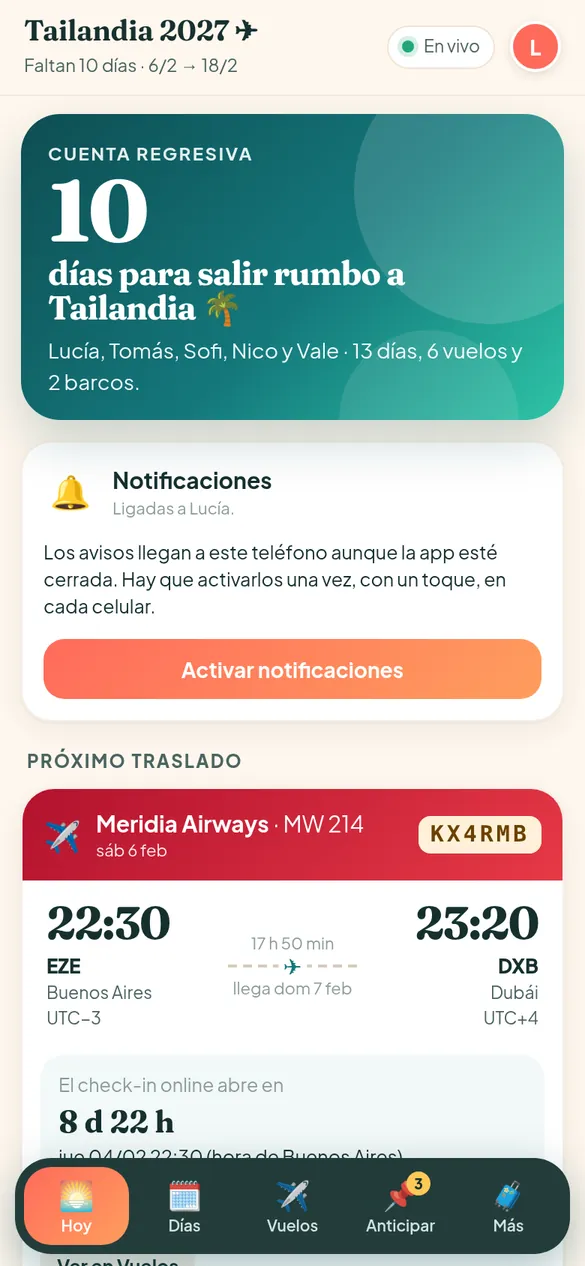
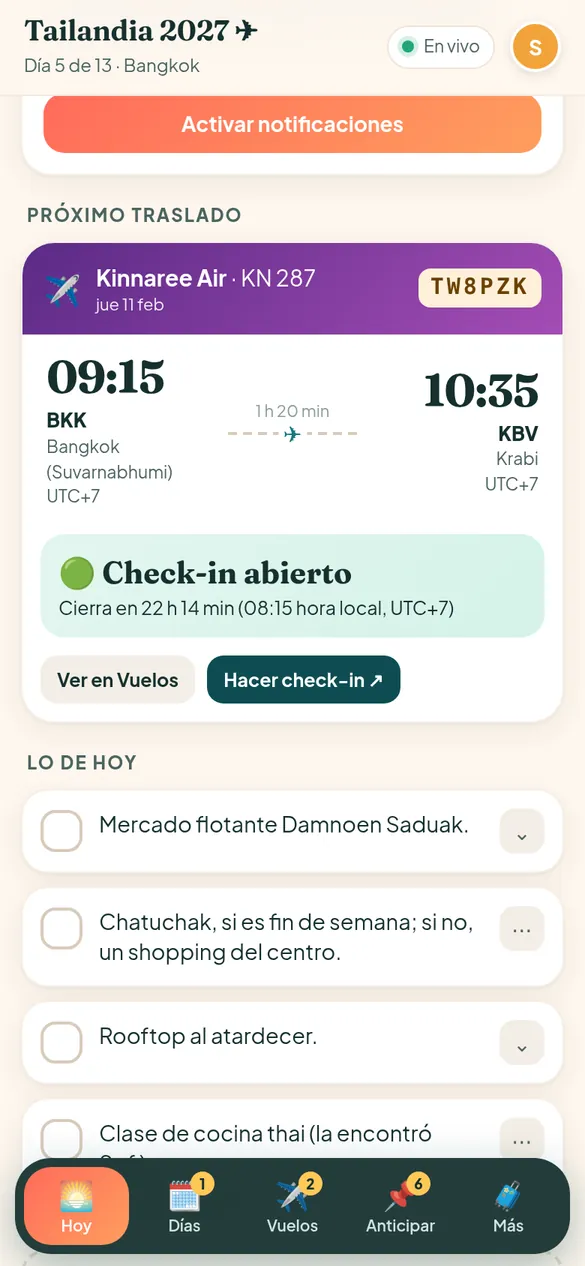
“Today”: what matters, as soon as you open the app
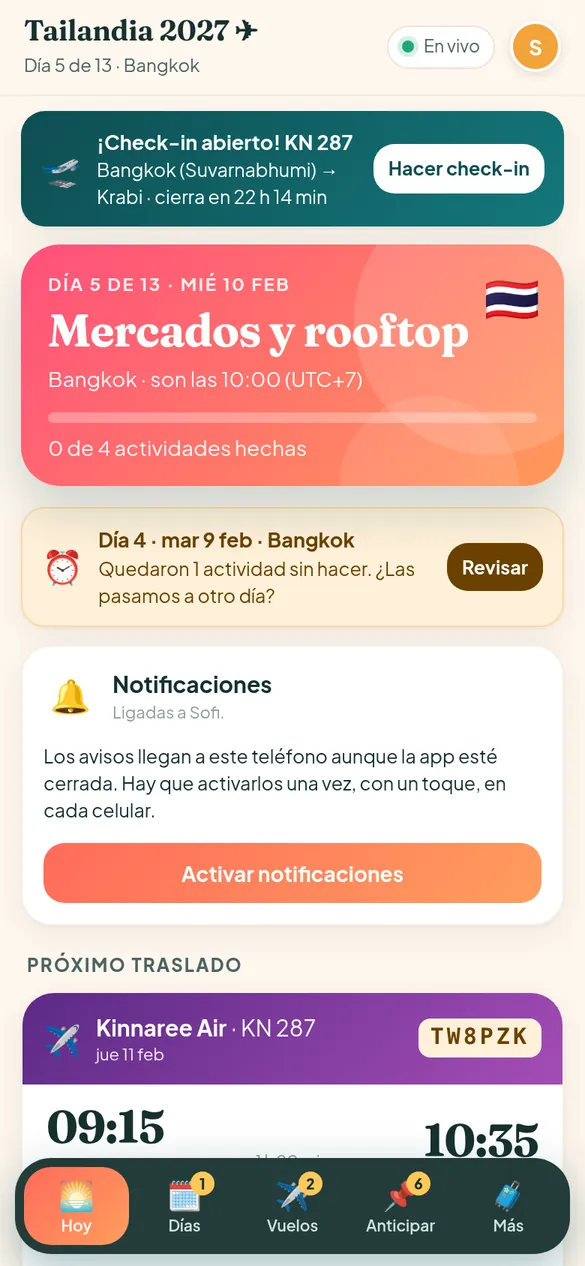
Before the trip it shows the countdown and whatever is most urgent to sort out. During the trip, the day you’re on, with its city, local time and how the day is going.
- A countdown to departure.
- Day X of N, city, local time and time zone.
- A progress bar: how many activities you’ve already done.
- The next transfer (flight or boat) and where you’re sleeping that night.
- Banners when check-in opens, or when something was left undone.
The full itinerary, day by day
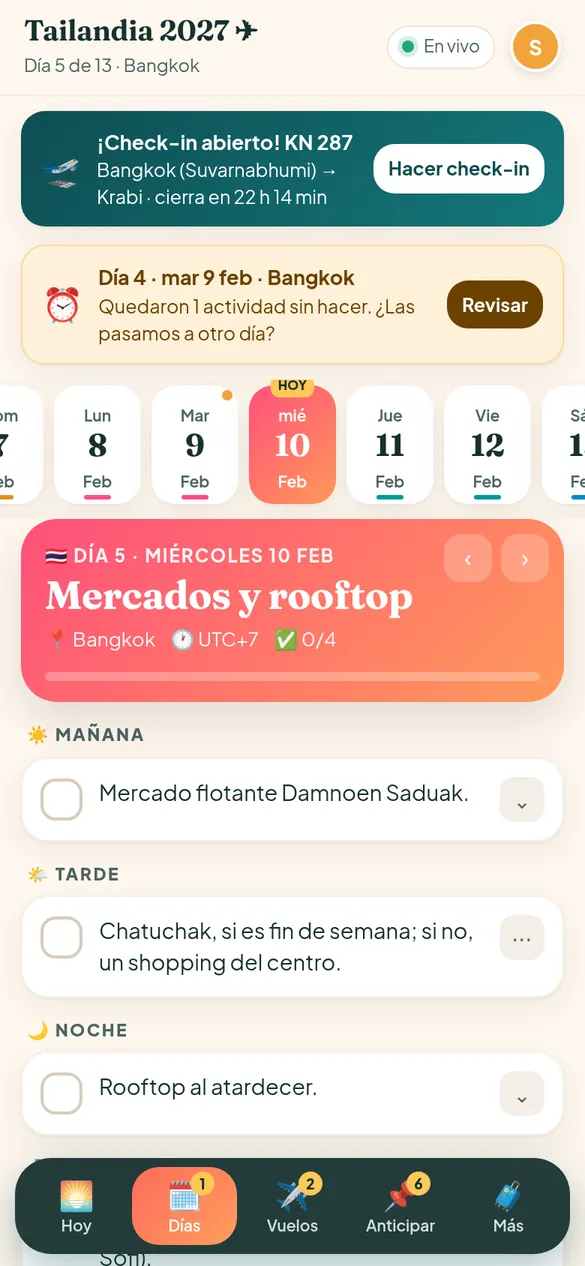
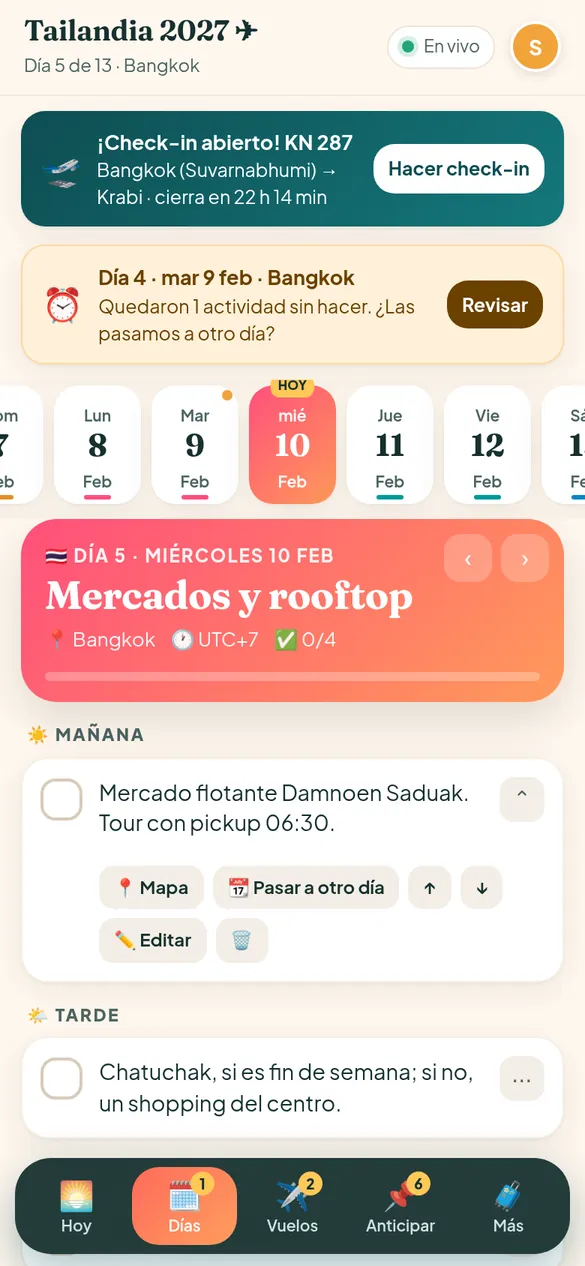
A strip with every day along the top, and on each day the activities split into morning, afternoon and night. Each city has its own color and flag, so you know where you are at a glance.
- Activities by time of day, with expandable details.
- A 📍 Map button on every activity and every hotel.
- Add, edit, delete and reorder activities. If someone changes a text, you can restore the original.
- A cost note on the activity (for example, how much the ticket is and how you pay).
- Notes and links for each day: bookings, tour phone numbers, Maps links.
- Flights, boats, and hotel check-in and check-out show up on their own on the right day.
What you didn’t do doesn’t get lost
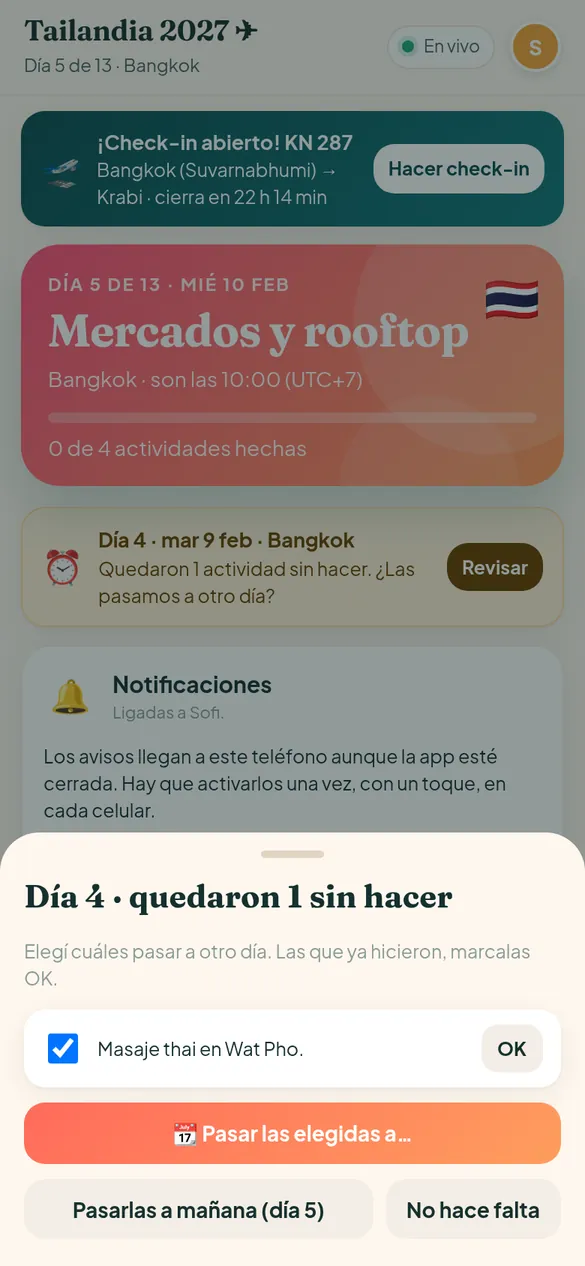
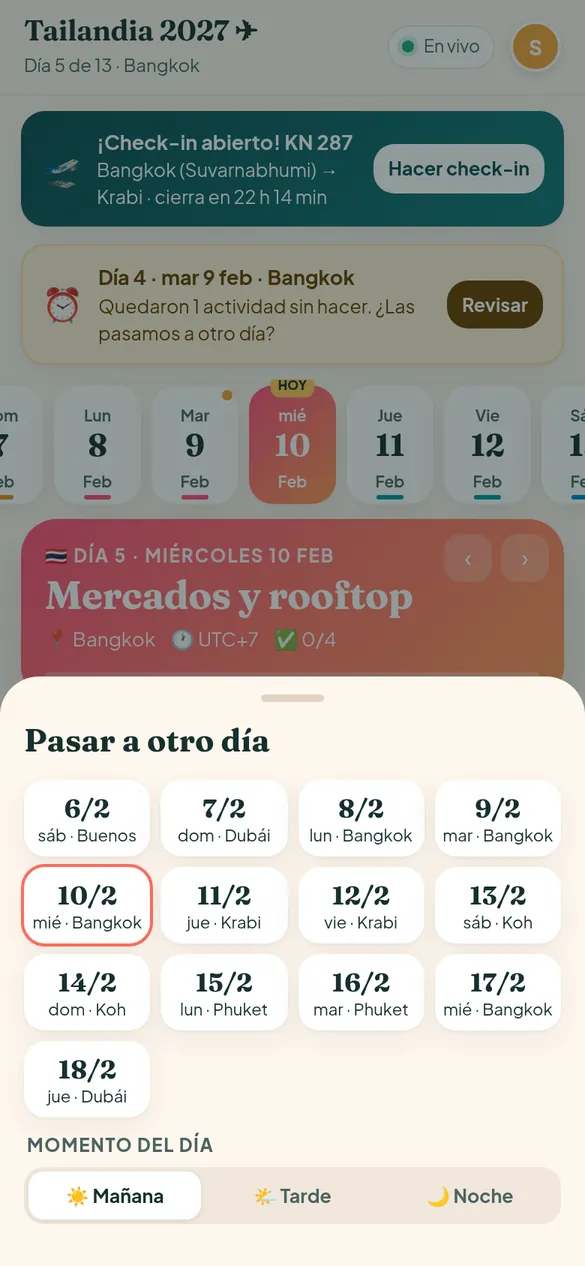
If a day ended and some activities were left unmarked, the app asks if you want to move them. You pick which ones, to which day and to which time of day.
- An alert with how many activities from that day are still pending.
- “Move them to tomorrow” in one tap, or pick another day.
- The ones you already did can be marked OK from the same alert.
- An orange dot on the strip marks days that still have leftovers.
Flights and boats, with check-in under control
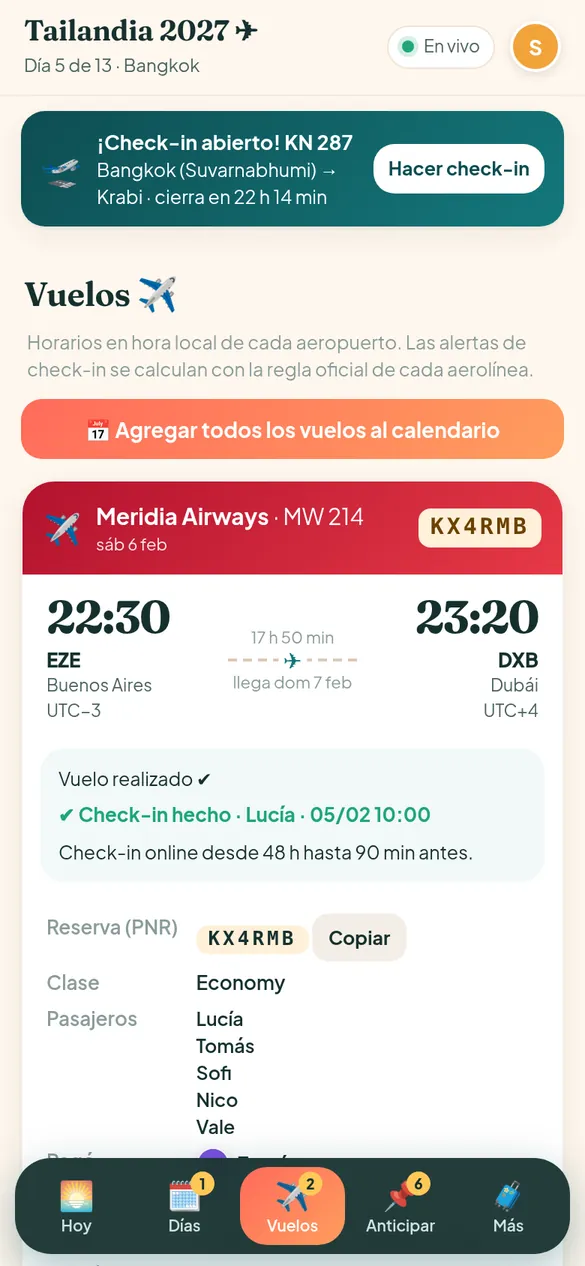
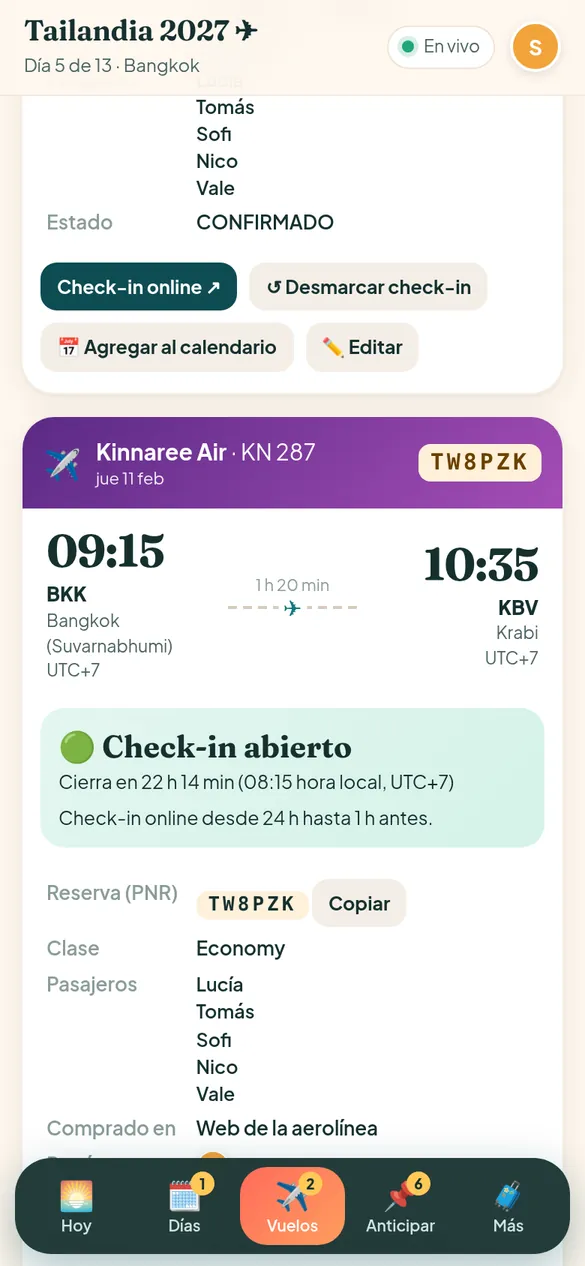
Every flight with local times for each airport, duration, booking code and who’s on it. The app works out when check-in opens and closes, according to each airline’s rule.
- A countdown until check-in opens, and until it closes.
- A button straight to online check-in, and “We’ve already checked in” so everyone knows.
- Booking code with a Copy button, cabin class, bags, who paid and the price per person.
- Boats and ferries: a reminder to be at the pier, or for lobby pickup.
- 📅 Add one flight, or all of them, to your phone calendar, with alarms.
- Times converted to Buenos Aires time when you need them.
Notifications that arrive even when the app is closed
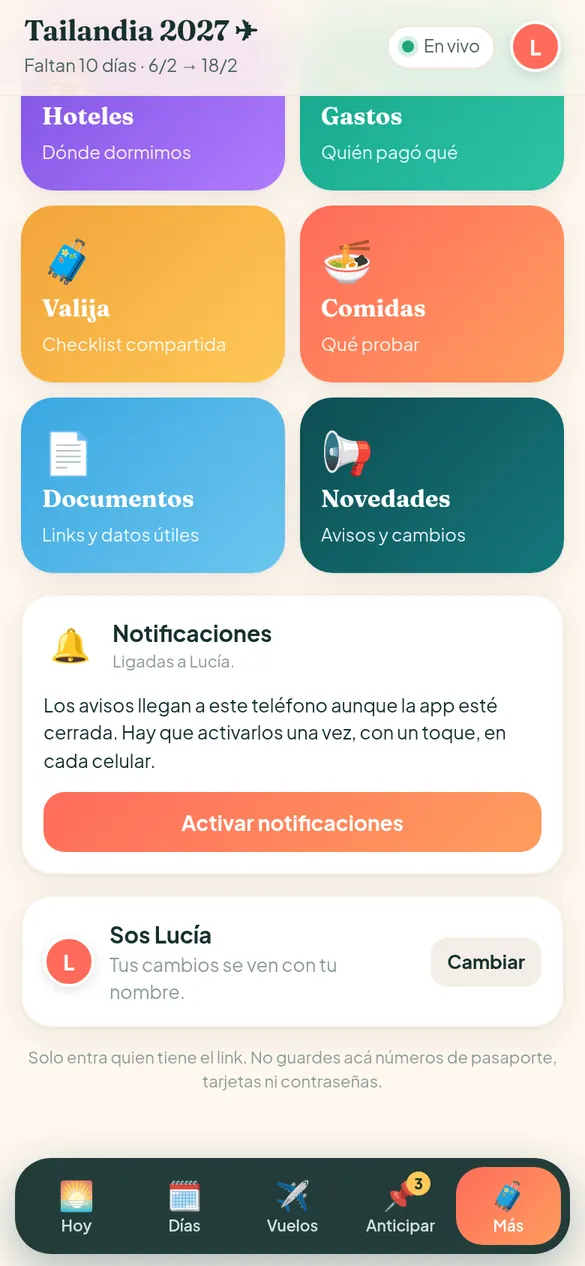
Each traveler turns on alerts once, with a tap. It works on Android and iPhone (with the app added to the home screen, iOS 16.4 or later).
- “Check-in is open!” and another alert about 3 hours before it closes.
- The night before and the morning of every boat or pickup.
- Dated to-dos, on the day they fall due.
- In the evening, if any activities were left undone.
- Group updates: expenses added and activities moved, bundled so you’re not flooded with alerts.
- A button to test that notifications actually arrive.
Shared expenses, without the arguments
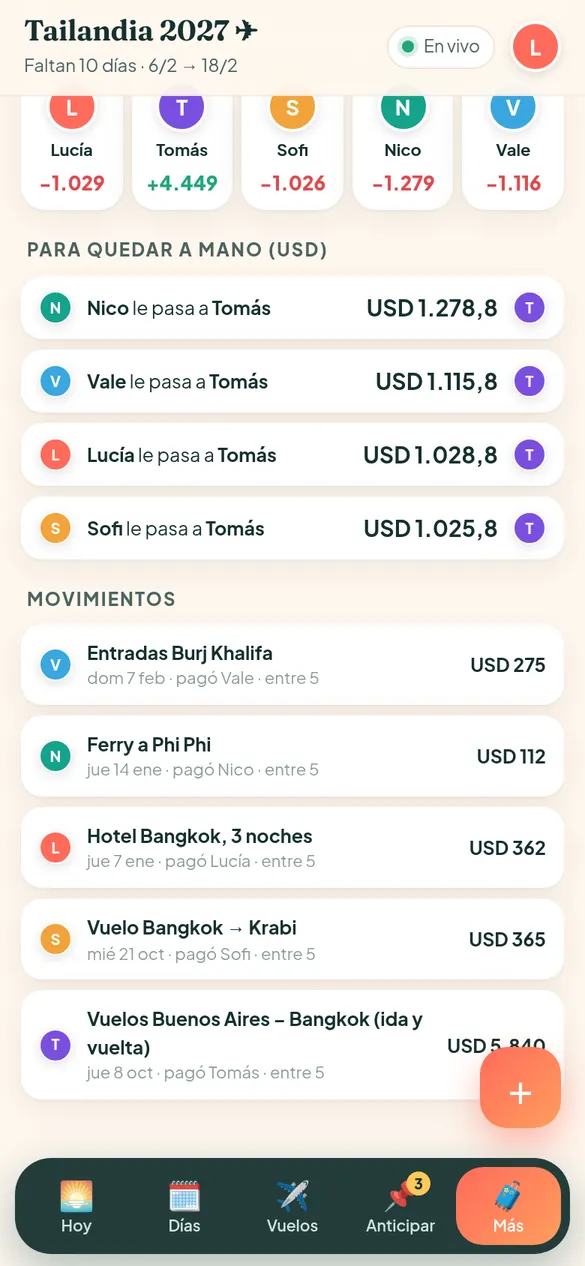
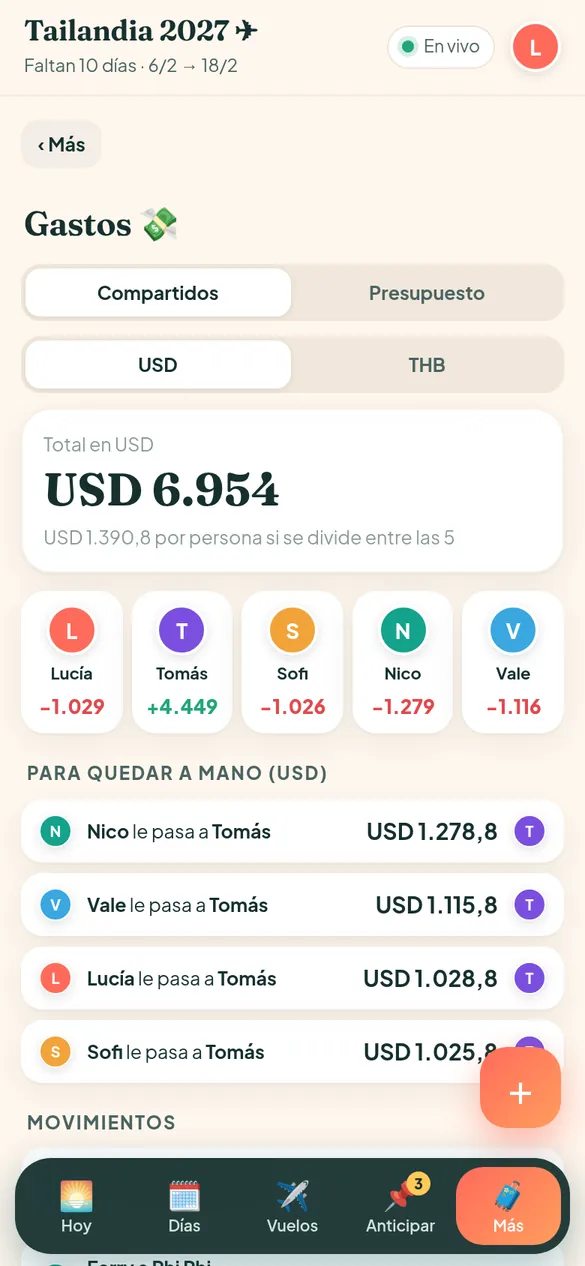
Each person adds what they paid, in the currency they paid in, and chooses who to split it with. The app works out each traveler’s balance and the shortest way to settle up.
- Several currencies on the same trip (dollars, pesos and the local currency).
- Each person’s balance in green or red.
- “To settle up”: who sends how much to whom.
- Flights and hotels already paid can be added as expenses.
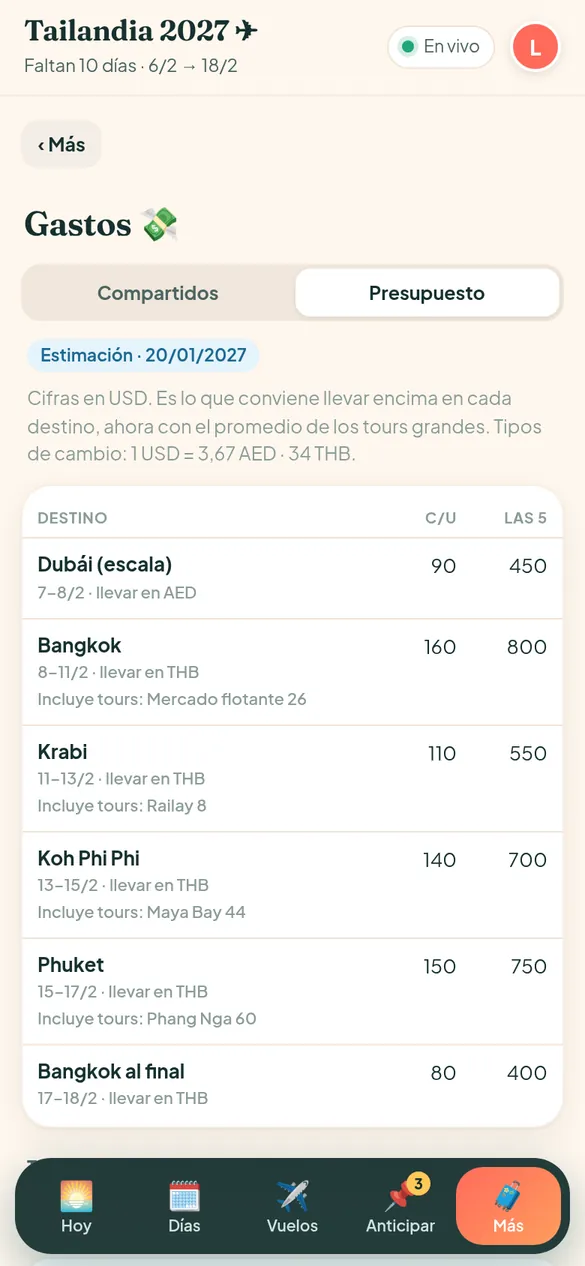
- A Budget tab: how much cash to bring at each destination, tours with a price range and a link, and the total per person.
To sort out first: what can’t wait
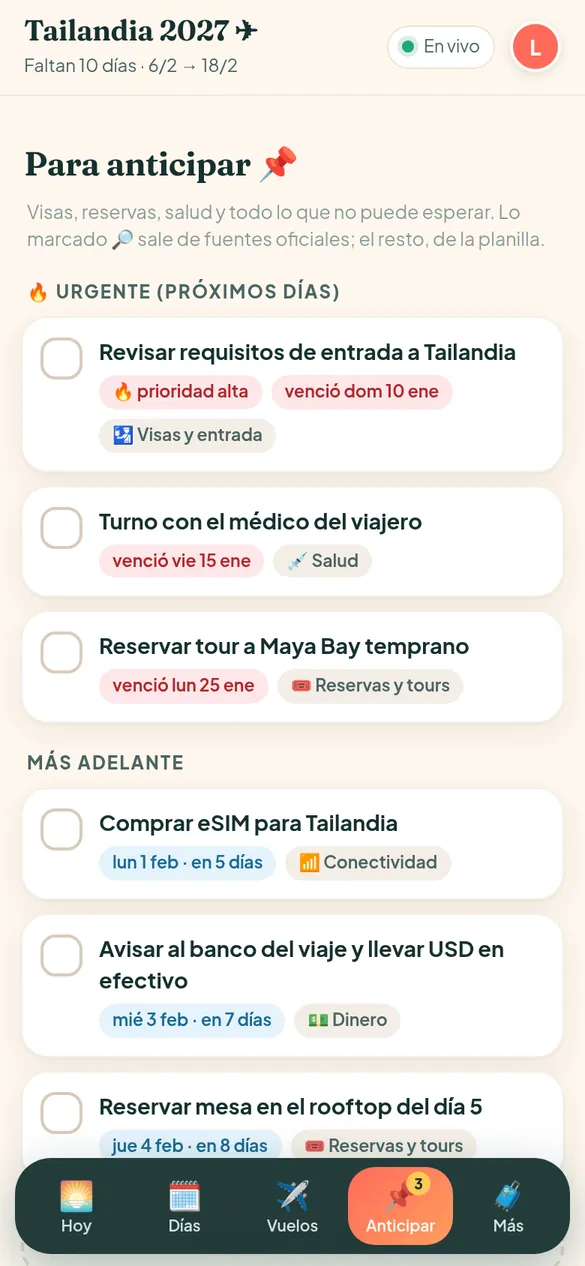
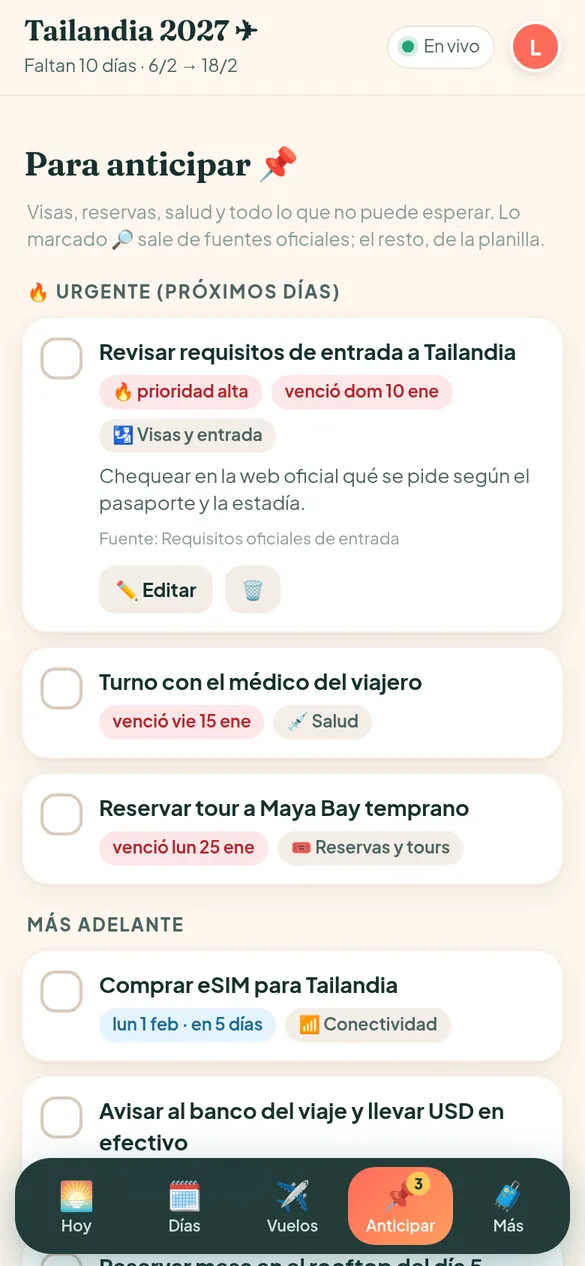
Visas, vaccines, insurance, tour bookings, eSIMs. Each to-do has a deadline, a category and a priority, sorted by urgency.
- An “Urgent (next few days)” section and a “Later on” section.
- A deadline with a “due tomorrow” or “overdue” warning.
- The details of each to-do, plus a link to the official source when it applies.
- Who marked it done, and when.
- A number on the menu for to-dos that are due soon.
Hotels, packing list, food and documents
Everything else for the trip, in the More section.
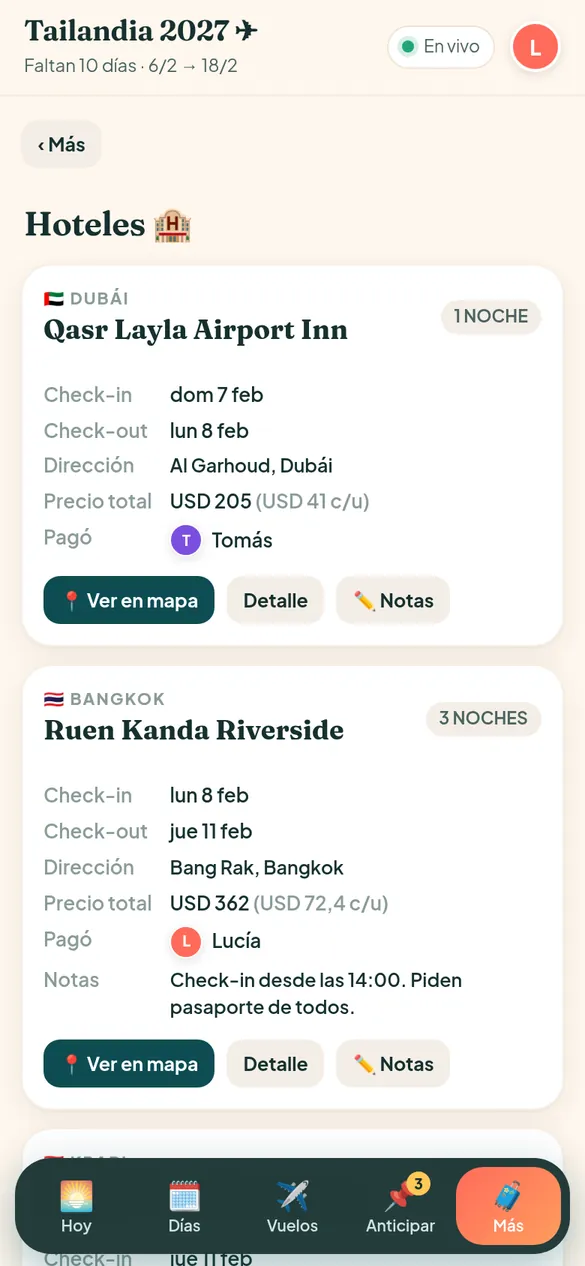
- Hotels: city, check-in and check-out dates, nights, address with a map, total and per-person price, who paid, and notes.
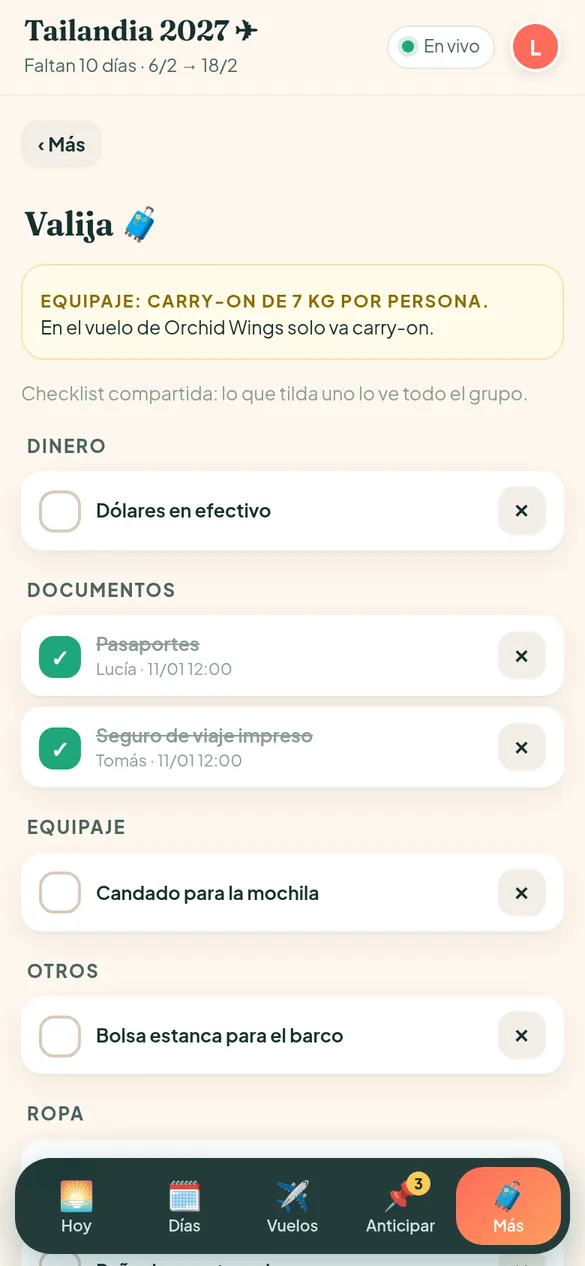
- Packing list: a shared checklist by category; what one person ticks, the whole group sees.
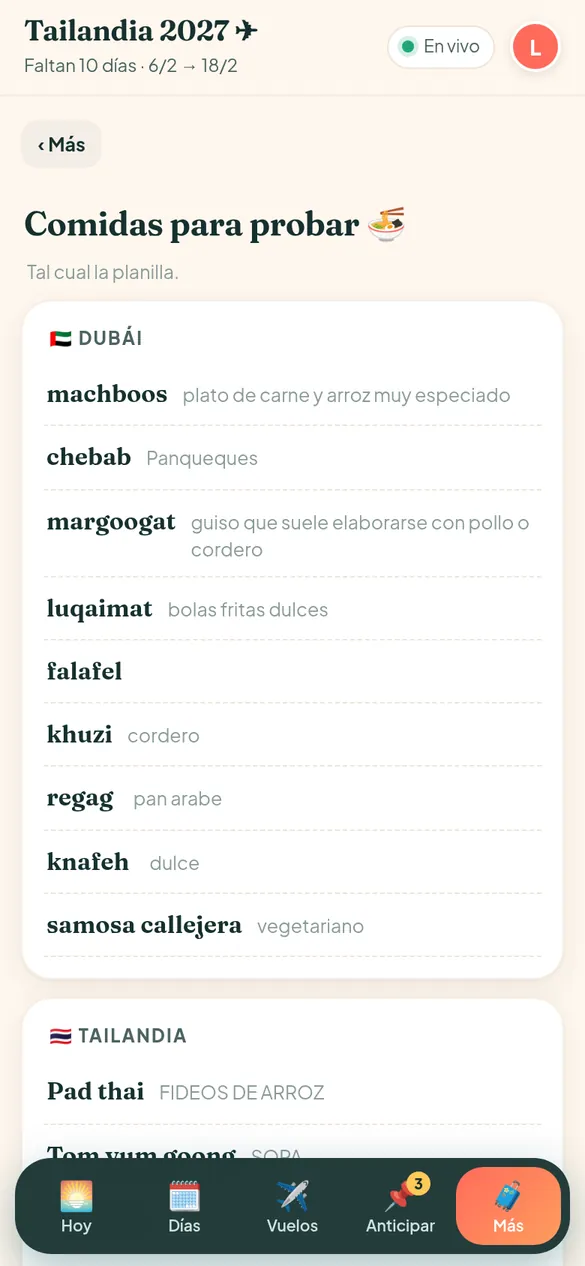
- Food to try in each country.
- Documents and links: bookings, insurance, useful contacts, always at hand.
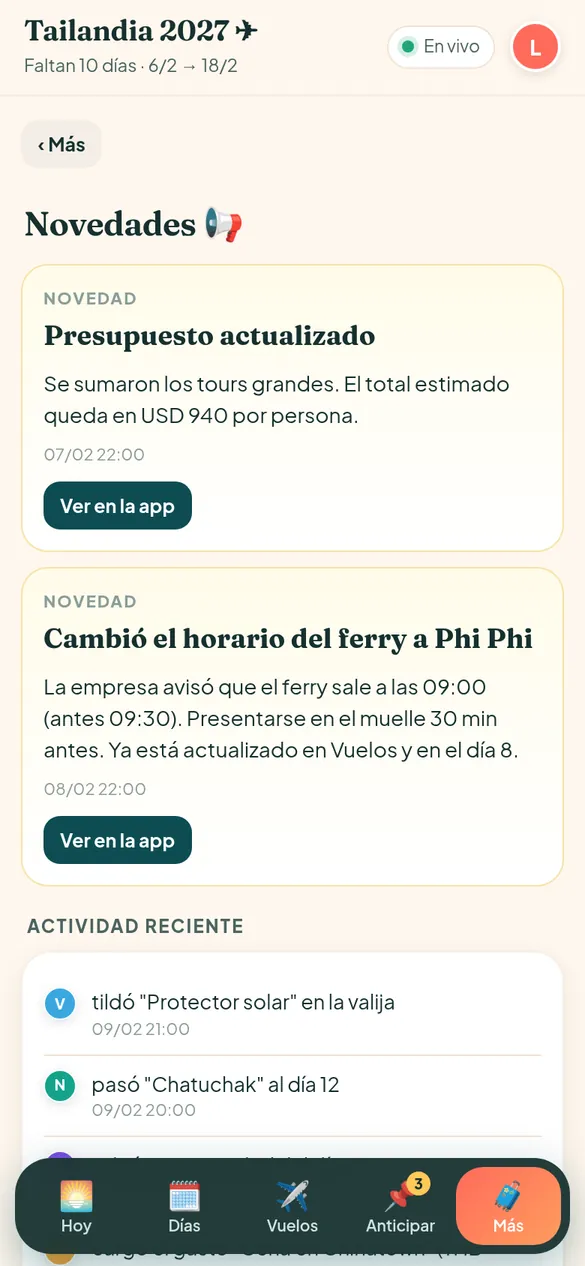
- Updates: important trip notices and a change history with name and time.
Live for everyone
Changes show up instantly on every phone. Up top you can see who’s online.
Works offline
The app stays saved on your phone. You can look at everything and make changes offline; they sync when you’re back online.
No accounts and no passwords
Each traveler opens the private trip link and picks their name. That way every change is signed.
It installs like an app
It adds to the home screen with its own icon. No need to download it from a store.
Built for multiple time zones
Every time is shown in the local time of where you are, with the time zone in sight.
Private
Only people with the link can get in, and the page doesn’t show up in search engines. The app reminds you not to store passports, cards or passwords.
How to use it, depending on who you are.
In the weeks before you leave, the app is the list of everything still to sort out.
You open it and see how long is left
The countdown, the first flight and what’s most urgent to do.
You sort out what’s urgent
Insurance, documents, bookings: each to-do with its deadline.
You pack as a team
Each person ticks their items and everyone else can see it.
You turn on the alerts
One tap, and your phone alerts you about check-in, boats and to-dos.
Once you’re traveling, the app tells you what’s on today and what’s next.
You see what’s on today
City, local time, activities and where you’re sleeping.
You tick off what you did
You open the map, tap OK, and the whole group sees it.
You check in on time
The app tells you when it opens and takes you straight there.
You log the expenses
By the end of the trip, you already know who sends how much to whom.
If you’re the one organizing the trip (or you coordinate groups), you stop being the group’s call center.
The full itinerary is already in
Days, activities, flights, boats and hotels, all in one place.
You change something and everyone gets it
Edit, move or add. Every change is signed with a name and a time.
You post updates
A time change lands in Updates and in the history.
You share the budget
How much cash to bring at each destination, and how much each tour costs.
For each traveler it’s simple: a link, their name, and that’s it.
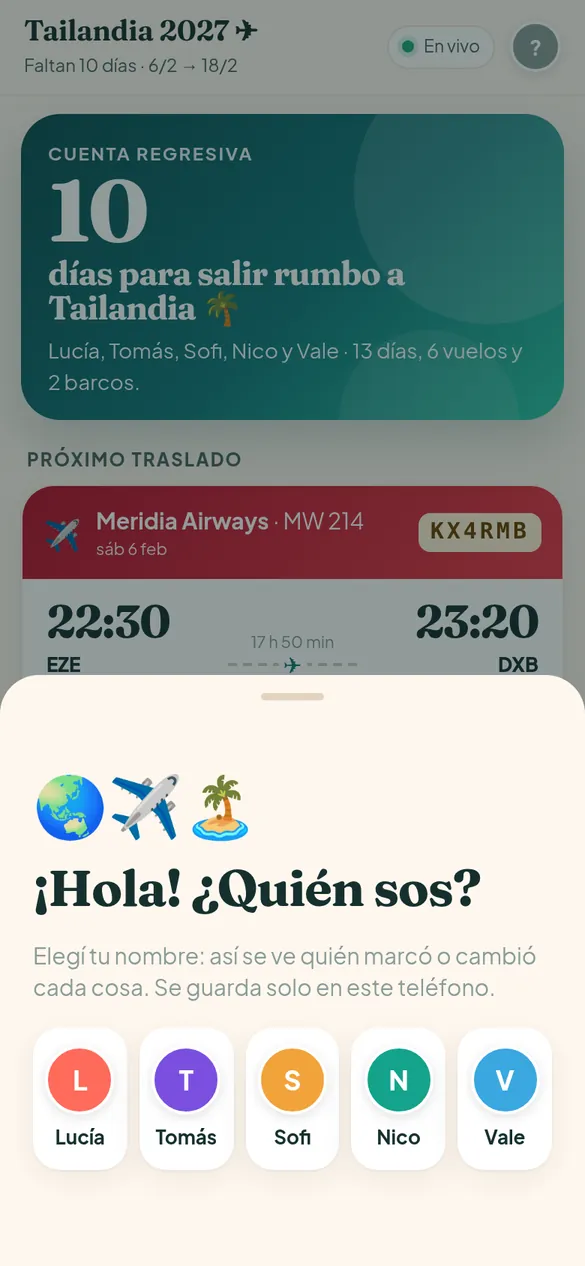
You open the link and pick your name
No account and no password to create.
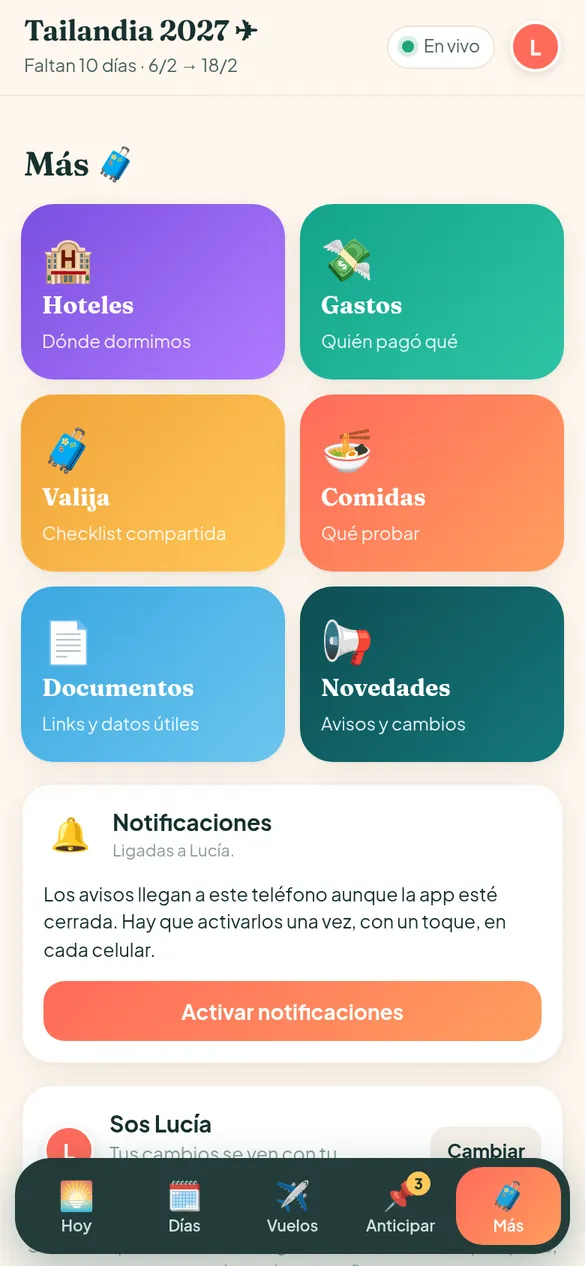
You find everything under “More”
Hotels, expenses, packing list, food, documents and updates.
You see changes live
Whatever another traveler does shows up on your phone right away.
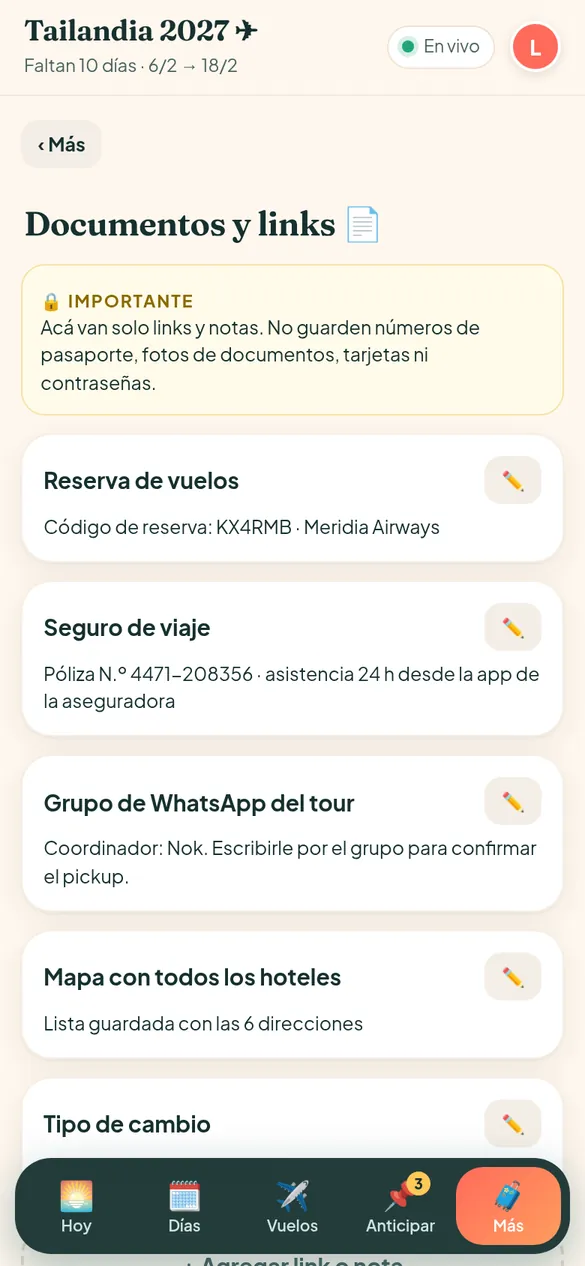
Bookings are right there
Codes, links and contacts, even when you’re offline.
For any trip with more than one person.
Groups of friends
Long trips with lots of legs, where everyone wants to know what’s next and who paid for what.
Families
One place for flights, hotels and documents, so nobody has to depend on a single phone.
Special trips
Bachelor or bachelorette trips, graduations, birthdays or a honeymoon with friends: lots of details and dates.
Coordinators and agencies
One app per group, so your travelers have everything and ask you less.
Swipe through every screen.
Do you organize trips for others?
If you have an agency or you organize groups, we can build a custom app or plan for your travelers. We shape it around your group or your agency, with no set price in advance.
- A custom app or plan for your group or agency
- We talk it through on WhatsApp and build it together
- The price is set in each case
What everyone asks us.
What exactly is the app?
It’s a web app built for your trip: the day-by-day itinerary, flights and boats with check-in alerts, hotels, shared expenses, the packing list, to-dos and documents. The whole group can see it and edit it live from their phones.
Do I have to download it from an app store?
No. It opens from a link in the browser and adds to the home screen with its own icon, like any other app. On iPhone, go to Share → Add to Home Screen.
How much does it cost?
USD 50 per traveler. If 4 of you are going, that’s USD 200 in total. Any question about payment, just ask us.
How do I pay?
Ask us: we’ll tell you the payment options when we message you on WhatsApp.
Who enters the itinerary?
You send us your spreadsheet, the booking emails or whatever you have, and we build your app with your trip. After that, any traveler can add, edit or move activities from the app.
Does it work offline?
Yes. The app stays saved on your phone: you can see the itinerary, flights and bookings with no signal. If you make changes offline, they’re saved and sync on their own when you’re back online.
Do notifications arrive on iPhone?
Yes, on iPhone with iOS 16.4 or later, with the app added to the home screen. On Android they arrive from the browser. Each traveler turns them on once with a tap, and there’s a button to test that they arrive.
What alerts does it send?
When online check-in opens for each flight, and about 3 hours before it closes; the night before and the morning of every boat or pickup; the day a to-do is due; in the evening if any activities were left undone; and group updates, like new expenses or moved activities.
Do I need to create an account?
No. Each traveler opens the private trip link and picks their name. That way every change is tagged with their name and the time.
Is it secure? Who can see my trip?
Only people with the private trip link, and the page doesn’t show up in search engines. Even so, the app reminds you not to store passport numbers, ID photos, cards or passwords.
Does it work for any destination?
Yes. It handles several countries and time zones on the same trip, with every time in local time and a conversion to Buenos Aires time when you need it.
How do shared expenses work?
Each person adds what they paid, in the currency they paid in, and chooses who to split it with. The app shows each traveler’s balance and who needs to send how much to whom to settle up, broken out by currency.
Can I add the flights to my calendar?
Yes. Each flight, or all of them together, can be added to your phone calendar with alarms for check-in and departure.
How many people can use it?
It’s set up with the names of everyone in the group, and the price is per traveler. If you’re a very large group, just ask us.
What happens to the app when the trip ends?
Ask us and we’ll tell you how access to the app works after the trip.
Do you work with agencies or trip organizers?
Yes. We put together a custom plan or app for your group or your agency. Message us or fill in the agencies form and we’ll go over it together. The price is set in each case.